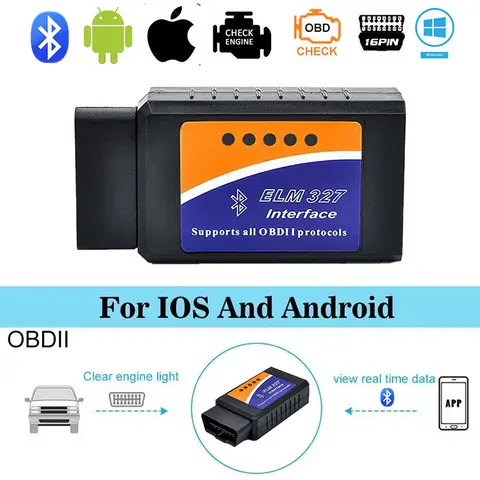
What is ODB2 and Why is it Important for My Car?
Answer: ODB2 (On-Board Diagnostics 2) is a standardized system in vehicles that allows mechanics and car owners to access diagnostic information about a car's performance and potential issues. It is important because it helps identify and resolve problems efficiently, often before they become serious.
- ODB2
- On-Board Diagnostics 2 is a vehicle diagnostic system that provides access to real-time data from a car's engine and other systems.
- ECU
- Electronic Control Unit is the car's onboard computer that processes and stores diagnostic data.
For example, imagine you are a car owner who recently noticed the Check Engine light on your dashboard. You want to know what the issue is without taking your car to a mechanic. In this scenario, an ODB2 scanner becomes essential.
- Locate the ODB2 port in your car, usually under the dashboard near the steering wheel.
- Connect the ODB2 scanner to the port.
- Turn on the car's ignition (without starting the engine).
- Use the scanner to read the diagnostic trouble codes (DTCs) stored in the ECU.
- Interpret the codes using the scanner's built-in database or an online resource.
Common codes include P0171 (System Too Lean), P0420 (Catalyst Efficiency Below Threshold), and P0300 (Random/Multiple Cylinder Misfire Detected). These codes help identify issues with the fuel system, emissions, or engine performance.
How to Choose the Best ODB2 Scanner for My Car?
Answer: The best ODB2 scanner for your car depends on your vehicle's make and model, the type of diagnostic information you need, and your budget. Look for a scanner that supports all ODB2 protocols and offers features like live data, code clearing, and freeze frame data. When choosing an ODB2 scanner, consider the following factors:
| Feature | Basic Scanner | Advanced Scanner |
| Code Reading | Yes | Yes |
| Live Data | No | Yes |
| Code Clearing | Yes | Yes |
| Freeze Frame Data | No | Yes |
| Bluetooth/Wi-Fi | No | Yes |
| Price | $20–$50 | $100–$300 |
For example, if you own a 2015 Toyota Corolla and want to monitor your car's performance regularly, an advanced ODB2 scanner with live data and Bluetooth connectivity would be ideal. This allows you to track engine parameters like RPM, coolant temperature, and oxygen sensor readings in real time.
- Identify your car's make, model, and year.
- Check if the scanner supports all ODB2 protocols (e.g., ISO 9141-2, KWP2000, CAN).
- Look for additional features like live data, graphing, and vehicle-specific support.
- Compare prices and read user reviews to ensure reliability and accuracy.
- Purchase the scanner and test it with your car to confirm compatibility.
What are the Common Issues with ODB2 Scanners and How to Fix Them?
Answer: Common issues with ODB2 scanners include connection problems, incorrect code readings, and software incompatibility. These can often be resolved by checking the scanner's firmware, ensuring a secure connection, and using the correct diagnostic software. For example, if you recently purchased an ODB2 scanner and it fails to connect to your car's ECU, the issue might be related to the scanner's firmware or the ODB2 port itself.
- Ensure the ODB2 scanner is fully charged or connected to a power source.
- Check the ODB2 port for dirt or damage and clean it if necessary.
- Verify that the scanner supports your car's make and model.
- Update the scanner's firmware using the manufacturer's software or app.
- Try a different ODB2 scanner or port if the issue persists.
If the scanner still doesn't work, it may be incompatible with your vehicle. In such cases, look for a scanner that explicitly supports your car's ODB2 protocol. Some scanners may work with
ODB1 (e.g.,
ODB1) or other variants like
ODB 1 or
ODB 2 key, but these are not the same as ODB2.
User Reviews and Experiences with ODB2 Scanners
Answer: Users generally report positive experiences with ODB2 scanners, especially when they are compatible with their vehicles and provide accurate diagnostic information. However, some users have encountered issues with low-quality or counterfeit devices. Many users on AliExpress and other online marketplaces have shared their experiences with various ODB2 scanners. For example, one user reported that a particular ODB2 scanner worked well with their 2012 Honda Civic and provided accurate readings for P0420 and P0171 codes. Another user mentioned that a cheaper ODB2 scanner failed to connect to their 2016 Ford Focus, leading to frustration and the need to return the product. When choosing an ODB2 scanner, it's important to read user reviews and look for devices with high ratings and positive feedback. Pay attention to comments about compatibility, ease of use, and the accuracy of code readings. Avoid devices with poor reviews or those that do not specify the supported protocols.
Other Related Terms and Products You Might Be Interested In
Answer: While ODB2 is the most common diagnostic system, there are other related terms and products that you might encounter, such as
ODB1,
ODB 1,
ODB 2,
OBDD2,
ODB,
OD2,
ODBOD,
OMBD,
ODB 5,
OBDD2B,
ODBCS,
ODB 2 key,
ODKB,
ODB2 ACC,
ODBODS,
ODBS, and
OB2D. These terms often refer to variations of the ODB system or related diagnostic tools. For example,
ODB1 is an earlier version of the ODB system used in vehicles before 1996, while
OBDD2 is a more recent and advanced version.
ODB 2 key might refer to a specific type of diagnostic key or tool used in certain vehicle models. If you're unsure about the exact meaning of these terms, it's best to consult the manufacturer's documentation or a trusted automotive resource.